
Telegram bot: advanced
Live trips
Start a trip from /nav and get a live card of when you'll arrive, a Get Off Alert, and a link others can follow.
A live trip is a card in your chat with the bot that keeps itself up to date while you travel. Share it, and whoever opens the link gets the same card in their own chat with the bot, updated at the same moment as yours.
Start a trip
- Plan the way with (Navigate with /nav) and tap the way you're taking.
- Tap ▶️ Start trip. It's there for a way that sets off now or soon, and has a bus or a train in it.
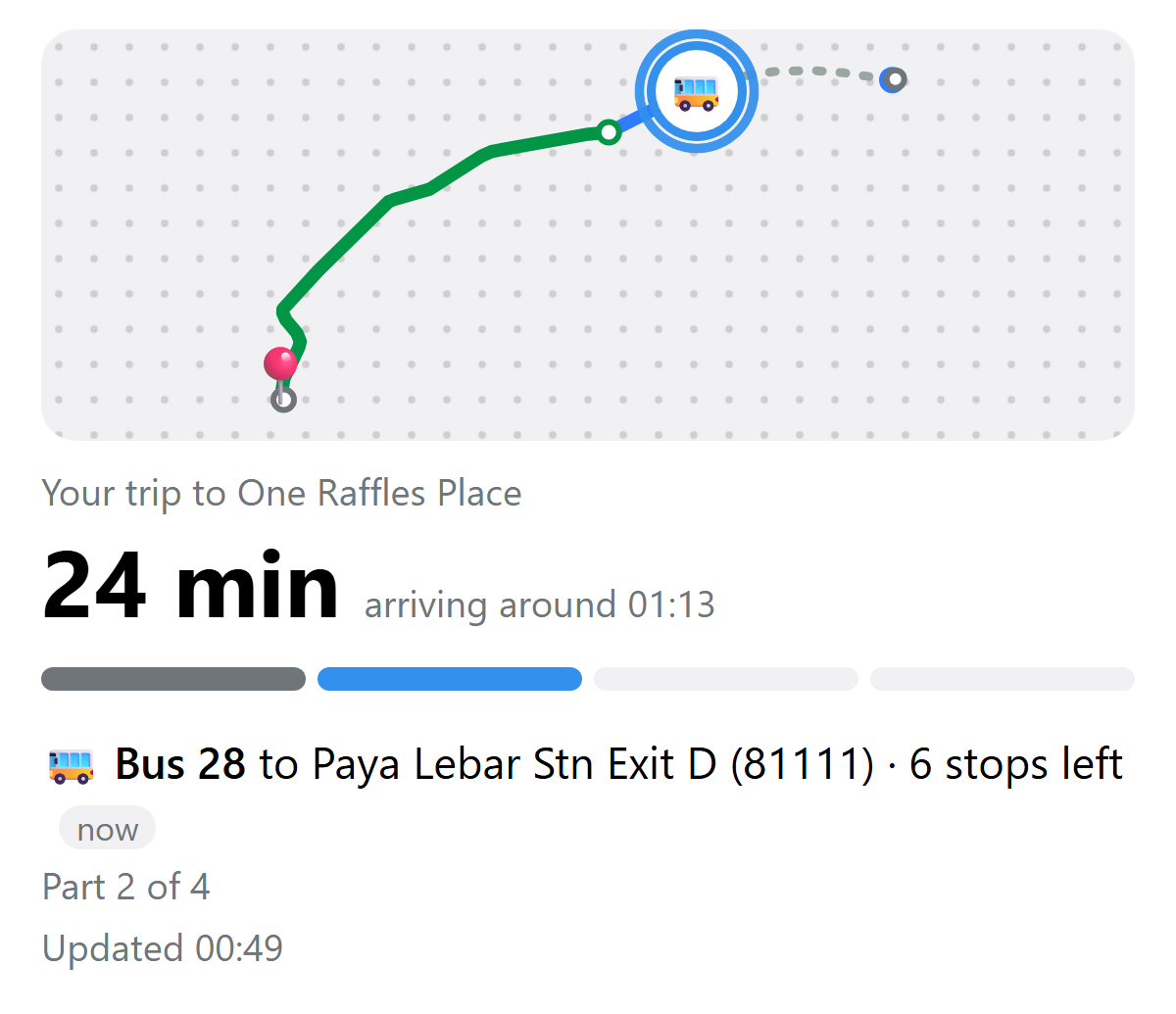
The card shows:
- A map of the way, along the roads, the MRT and LRT tracks and the footpaths it really takes: buses in blue, each train in its line's colour, walks dotted, and what you've gone over in grey. A dot marks each change, 📍 the end, and you (🚌, 🚆 or 🚶) where you are. Tap it to close in on where you are, and again to see the whole way. It's the way itself on a plain dotted panel, without streets: a Telegram card can't load a street map.
- When you'll arrive, in minutes and around what time. Tap the minutes to see the time instead, and tap again to switch back.
- The trip's parts, as a bar: done, the one you're on (lit), and the ones still to come. Tap a part to see where it goes; tap it again to go back to the part you're on.
- The part you're on: the bus, train or walk, where it goes, and the stops left. On an MRT or LRT train, 🚪 which door numbers to stand at, each drawn as a platform door in the line's colour, for the escalators, lift and stairs where you get off, or for your next train if you change there, or that it's a change across the platform; and where the number is on the platform door. Tap a train part still to come on the bar to see its doors ahead of time. As in the web app, for the stations that have them so far.
- When it was last updated. If it's been more than five minutes, it says when it last heard instead.
The trip moves on by itself, minute by minute: by the clock, and by where LTA says your bus is.
Your location
Your location keeps the trip exact. When the trip starts, the bot asks for it:
- Share your live location for the trip: tap 📎, then Location, then Share My Live Location, for as long as the trip takes. The trip follows you as you go, until you stop sharing it.
- Or tap 📍 Send my location to put the trip right once. 🔄 Refresh offers it again when the bot hasn't had your location in the last few minutes.
The bot finds which part you're on and how far along it, and the card, the arrival time and the Get Off Alert go by that. Between locations, the trip carries on by the clock and LTA from where you were. A location off the way you're taking leaves the trip as it was.
Anyone following sees where you are as the dot on the web app's live map. Your location is only used for the trip you're on. Telegram on a computer can't send a location, so there the trip goes by the clock and LTA alone.
Get Off Alert
Two stops before you get off a bus or train, the bot sends 🔔 Get off in 2 stops, at Paya Lebar Stn Exit D, with to change when there's another ride after it, and Get off now at the stop itself.
uwuCoins
Get to the end of a trip with a ride on it your location shows was real, and it earns uwuCoins, counted up on its card when you arrive.
End it
Tap 🏁 End trip under the card. A trip also ends by itself when you get to the end. Starting another trip ends the one you're on. Send to see your trip's card again.
Share it
Tap 📤 Share this trip and pick a chat. The message has two links:
| Link | Opens |
|---|---|
| The same live card, in their own chat with the bot | |
| Your live progress in the web app, for anyone not on Telegram |
When you arrive, everyone following gets 🏁 Sam has arrived at One Raffles Place. The name is the one the bot calls you by, from (see Settings).
Follow someone's trip
Open the link they sent, or tap Follow in Telegram on a trip someone shares from the web app, and tap Start if the bot asks. Their card arrives in your chat with the bot, with:
- 🗺 Follow on the map, their trip on the web app's live map.
- 🔄 Refresh, to check now rather than wait.
- ✖️ Stop following, to stop getting their trip. The card stays as it was.
Good to know
- Live cards are Telegram widgets, so they need an up-to-date Telegram app. They work in your own chat with the bot, not in groups, and can't be forwarded: share the link instead.
- Everything on the card is there for anyone with the link, until the trip ends. The web link stops working three hours after its last update.