
Android app: advanced
Navigate by bus only
Navigate's Bus only tab in the Android app: every bus between two stops, or the quickest journeys with a change, with live timings.
Navigate's Bus only tab answers "which bus gets me from here to there?" Give it two stops, and it lists every bus that runs from one to the other. When no single bus does, it finds the quickest journeys with up to three changes. It works it all out on your phone. For trains as well, and any place rather than a stop, use Bus and train.
Set the two ends
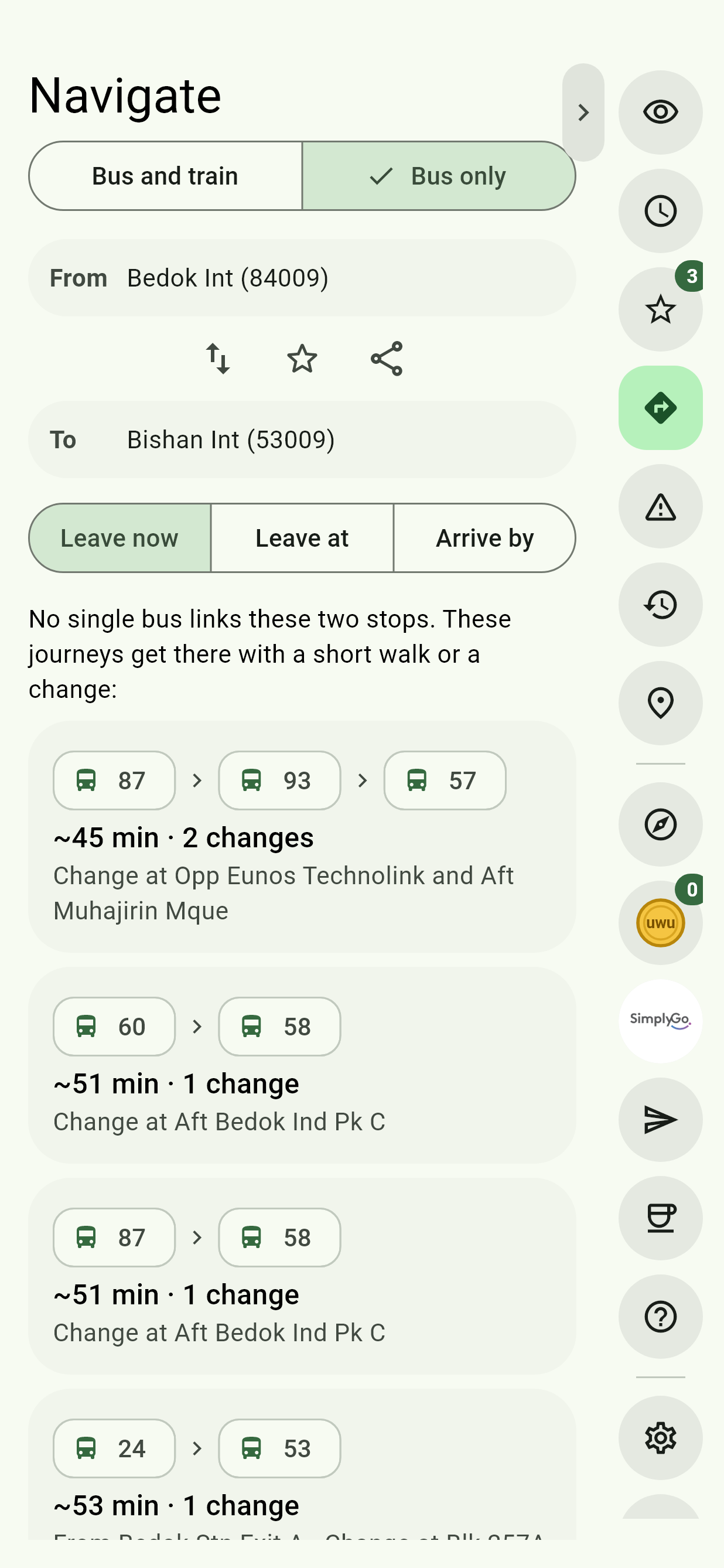
- Tap Navigate, the arrowhead in the Edge Tray, then the Bus only tab.
- Tap From. In the sheet, type a stop's name or code, or:
- tap Pick a start stop near me, for the stops around you;
- tap Home, Work or another of your places, for the stops near it, or the stop itself if the place is one;
- or tap one of your favourite stops, listed there.
- Do the same in To.
The swap button between the two ends turns the route around. The star beside it, once both are set, saves it to Favourites, and Share sends a link to it, with the time if you picked one.
Direct buses to the other end
Once one end is set, the stops offered for the other do some of the planning for you. Those with a bus straight to your end, or straight from your start, go to the top with their buses shown, and a line says how many there are. When none has one, it says so, and the planner looks for journeys with a change.
Pick a time
Leave now is picked to start with. Leave at and Arrive by plan for another time: pick the Day, today or any of the next six, and the time.
Only buses running at that time are offered, with public holidays counted as Sundays. A bus that runs the whole way but isn't running then is named under the list, as Not running at that time.
Buses that run the whole way
If one or more buses run from one stop to the other without a change, they're listed, with your favourite buses starred. Only a bus heading the right way counts. Tap one for the start stop's timings for it; Back to route returns here.
Journeys with a change
When no single bus links the two stops, you get the quickest journeys instead. Each shows its buses in order, roughly how long it takes on the move, how many changes, where to change, and where you get off when that isn't your end stop.
A journey can take up to three changes, and a walk of up to 200 m: to a stop across the road at either end, or between two buses. At an interchange, terminal or station, a change can be between any two of its stops up to 400 m apart.
Wrong side of the road?
If the quickest buses leave from the stop across the road, it says so, with how far away it is, and a button to Use that stop instead.
Open a journey
Tap a journey for it leg by leg, with live timings: the buses due before you'd get to a stop struck through as Gone by the time you get there, and The one you'd catch picked out. Each leg has a button for that stop's timings for the bus. Start trip starts a Get Off Alert on it, and Back to route goes back.
Live timings show from half an hour before you set off. Times are rough estimates from distance, counting an average wait for each bus.
Across the Causeway
A journey across the Causeway counts time to clear immigration at both checkpoints, as a step of its own. Set your own in Settings, Immigration time.